One live map for the whole group. Nothing to unlock.
Free, with no subscription, no sign-up and no feed.
Where is everyone, and the six things you need to say. 6signals puts your motorcycle group on one live map and gives every rider six signals a gloved thumb can hit at speed. Public beta, on iPhone and Android.
Arriving on the App Store and Google Play. Bookmark this page, or write to robertas@fragile.digital.
Nothing to unlock
The live map is the whole app, not a premium tier. There is no trial that turns into a bill, no account to create, no phone number or contact list to hand over, and no feed between you and the ride. Type a name, start a ride, read out the code.
Riding in a group is mostly a communication problem. Wind beats voices, nobody should read a message at 100 km/h, and hand signals stop working the moment the group strings out around a bend. 6signals answers the two questions that matter on the road, and deliberately nothing else.
One live map
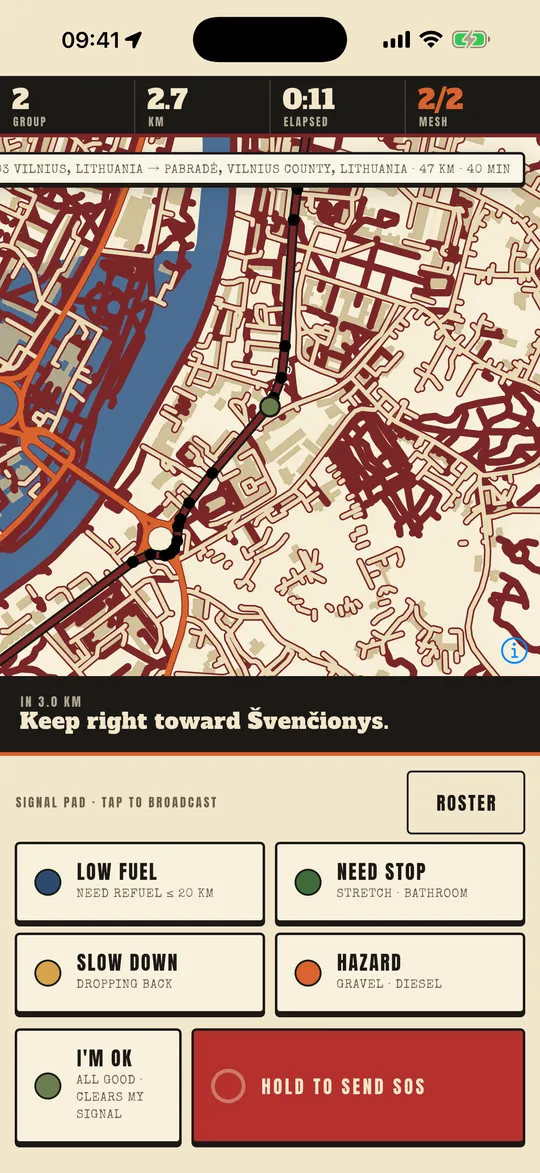
Every rider shows on the same map, moving as you go. The leader can see the sweep hasn't lost anyone. The sweep can see which fork the leader took. Join late and the group is already on your map.
Tap Follow me and the map stays on you; touch the map and it lets go. Your own distance and time since you joined sit across the top, next to how many riders are on the link.
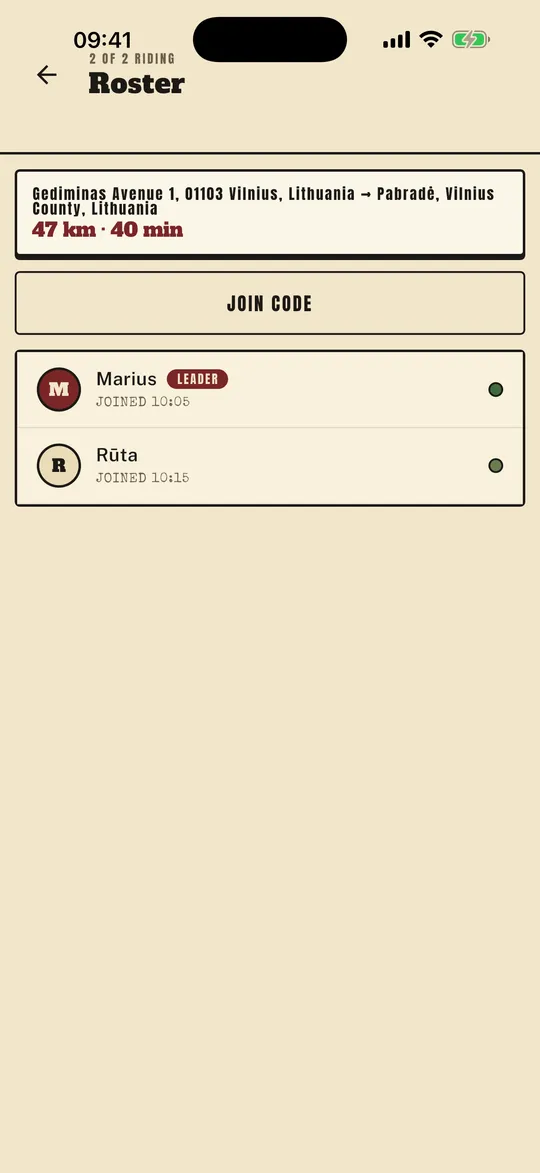
The roster shows who is riding, who leads, when each rider joined, and each rider's last signal as a coloured dot.
Six signals, no keyboard
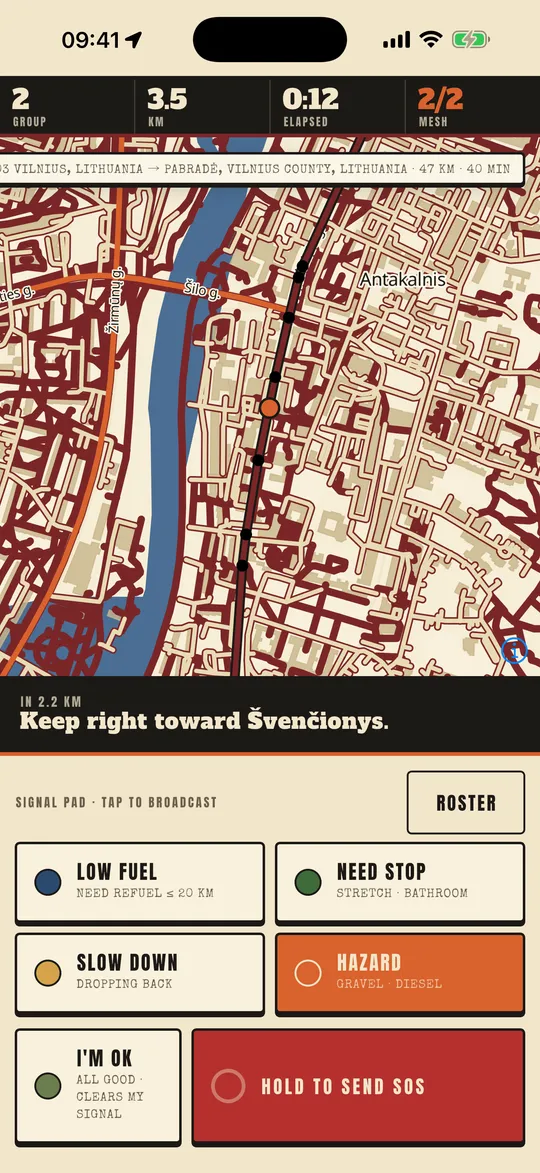
Four logistics keys, plus OK and SOS. A gloved thumb hits one and the whole group sees it.
- Low fuel I need a station soon
- Need stop pulling over at the next spot
- Slow down ease off, I'm dropping back
- Hazard gravel, diesel, an animal on the road
- I'm OK all good, and it clears your last signal
- SOS press and hold, so a bump never sends it
One tap and the whole group sees it: "Sam is low on fuel". Every key pairs a colour with a word, so it still reads in low sun. Your key and your beacon stay coloured for five minutes, and OK clears them. SOS turns your beacon red on everyone's map and stays up until they've seen it. It alerts the riders with you; it does not call emergency services.
One route for the whole group
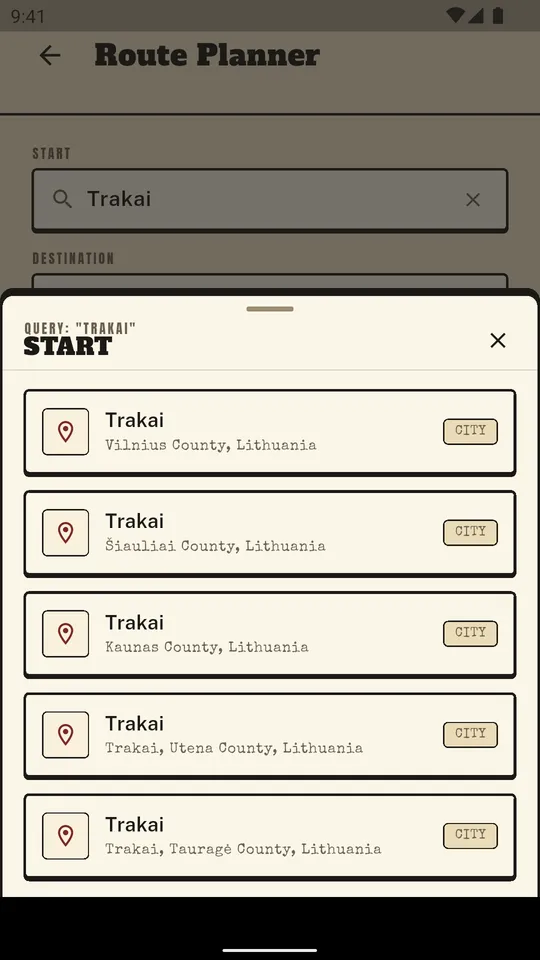
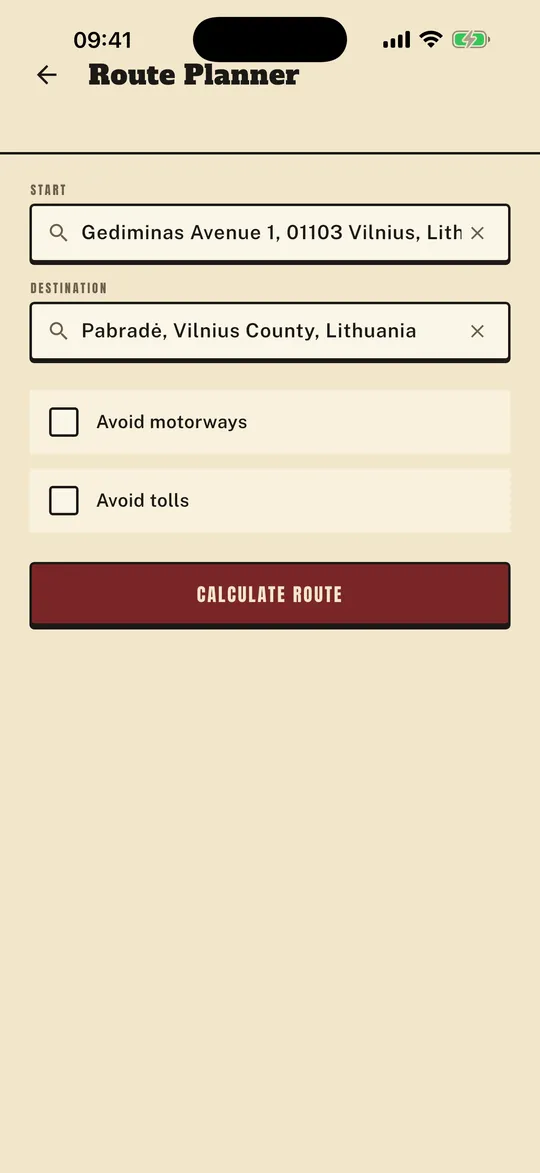
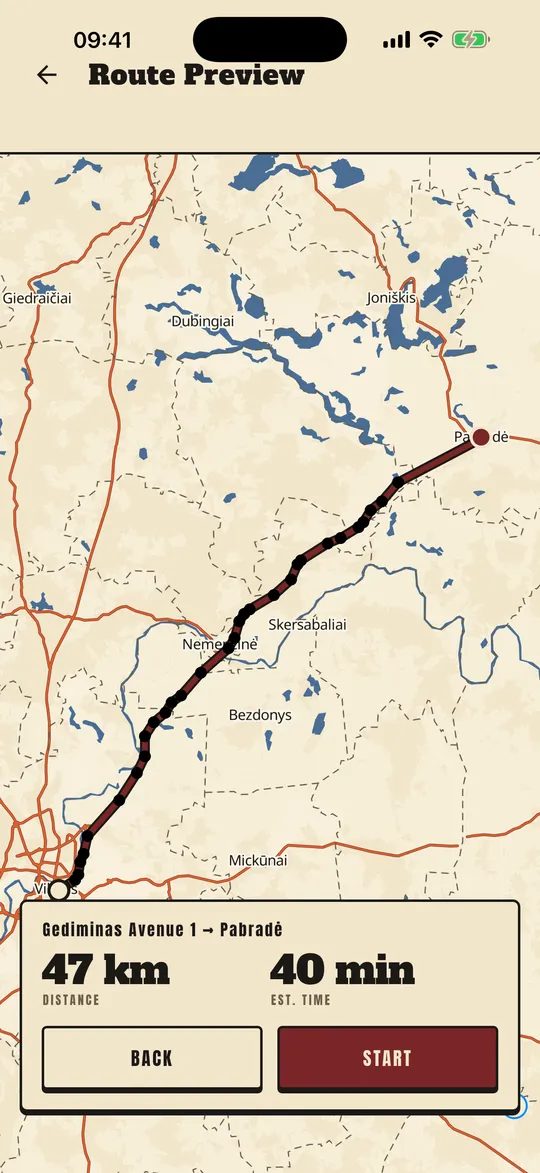
Search a start and a destination, tick Avoid motorways or Avoid tolls, and check the distance and time on the map before you commit. The route is calculated for a motorcycle.
Start the ride on it and every rider who joins gets the same line on their own screen, with the next turn and the distance to it. No GPX to forward, no screenshots of a map in the chat. Leave the line and the band says "Off route" until you're back on it; miss a turn and it picks you up further along. The route is kept on the phone, so the next turn still shows where the map cannot load.
Join with a code
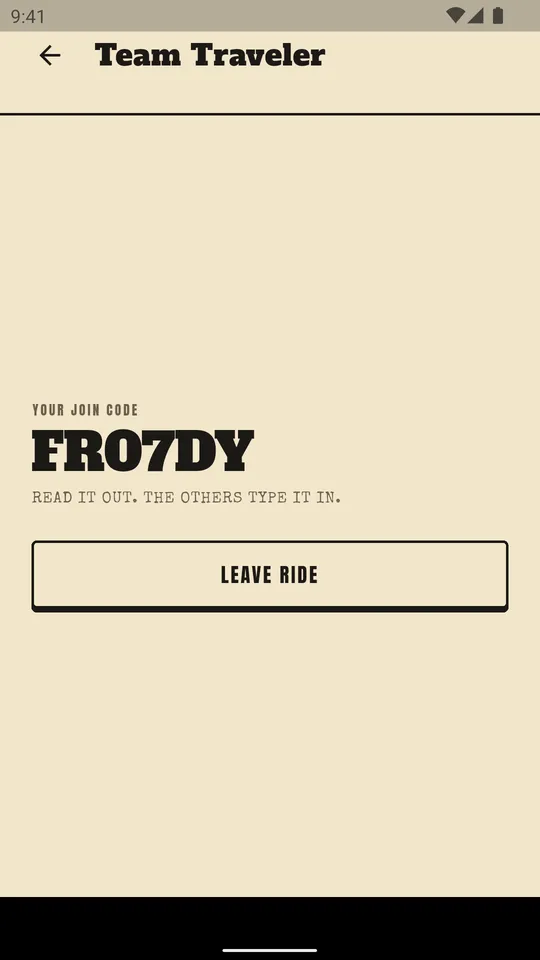
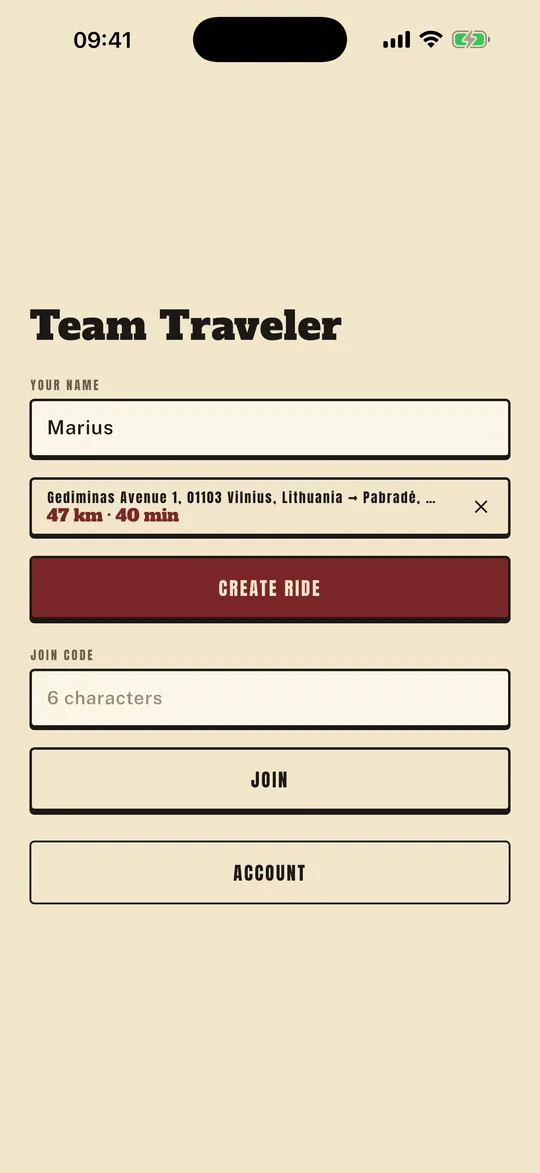
Type your name, start a ride and read out the six-character code at the fuel stop. The others type it in, and a 0 heard as an O still works, as does an I or an L heard as a 1.
Kill the app or restart the phone and you come straight back onto the ride, name prefilled. No accounts to create, no friend requests, no phone numbers.
Made for the bar mount
Signal keys are 64 points tall. Turn the phone sideways and they line up on the left, where the clutch hand can reach without the throttle hand leaving the grip, with OK and SOS pinned where a scroll cannot move them.
The palette is warm paper and tarmac ink rather than white on black, so nothing blooms behind a scratched visor. The screen stays on the whole way, and when you're back in signal the group reconnects on its own; pressing a key retries the link at once.
Every control has a spoken label, the layout holds at large text sizes, and follow, failures and going off route are announced. Refuse the location permission and the map and the signals still work; a banner says what to change.
Who sees your position
Only the riders who share your join code, and only while the app is in use. Nothing tracks you in the background, your last position expires from the server within a minute of your last update, and leaving the ride clears it.
No advertising identifier, and no track of your ride kept: positions are relayed to the group and never written to a database. Each rider's connection is issued for one ride and works for that ride only. Delete your account from inside the app at any time, and the server forgets you too.
What you will not find here
The things riders leave other apps over, and what stands in their place.
| Elsewhere | Here |
|---|---|
| A paywall, or a trial that turns into a bill | Free. No in-app purchases, no trial, no premium tier: the live map is the whole app. |
| Sign-in loops, forced registration, contact lists | An anonymous account made silently on first launch. The only thing you type is a name. |
| Feeds, clubs, friend requests | Four screens and a pad. Nothing between you and the ride. |
| Background tracking, and data that gets sold | Location only while the app is in use. No advertising identifier. Positions expire in thirty seconds and are never stored. |
| GPX files forwarded before the ride | Plan once. The route reaches every phone that joins with the code. |
| A map only the route's creator can see | The line, the summary and the next-turn band appear on every rider's screen. |
What it doesn't do
No chat and no voice, on purpose. It is not a sat-nav: there is no rerouting and no spoken directions. Maps and positions need mobile data. The rest of the list, so nobody installs it for the wrong reason:
- No chat, no voice, no feed and no clubs.
- No rerouting, no spoken directions, no ETA and no via-points: it is not a sat-nav.
- No offline maps yet. Map tiles and positions need mobile data.
- No background tracking, no ride recording, no history and no GPX export.
- No crash detection, and SOS does not call emergency services.
- No push notifications, invites or QR codes. The join code is read aloud.
- No night mode, no second language and no iPad layout yet.
- No payments, and nothing to unlock.
Switching from another app?
See what a live group map costs elsewhere, what an account costs you, and what those apps do better.
Questions
Is it free?
Yes. There is no subscription, no in-app purchase, no trial and no premium tier. If a paid tier ever exists it will be for something else, and this page will change.
Do I need an account?
No. An anonymous account is created on the phone the first time the app opens. You type a name for the ride and nothing else: no email, no phone number, no password.
Does it work on iPhone and Android?
Yes, and a ride can mix the two. It is in public beta on both.
Does it need mobile data?
Yes. Map tiles and the other riders' positions come over the network. The planned route is kept on the phone, so the next-turn band keeps working where the map cannot load.
Is it a sat-nav?
No. It shows the route the ride was planned on, the next turn and the distance to it, and says when you are off the line. There is no rerouting and there are no spoken directions.
Who can see my position?
The riders who share your join code, while the app is in use. Nobody else, and nothing afterwards: positions are relayed to the group and never written to a database.
Does it track me in the background?
No. Location is requested as while using the app, and closing the app stops the reporting.
Does SOS call emergency services?
No. SOS turns your beacon red on every rider's map and stays up until they have seen it. In an emergency, call your local emergency number.
How do I delete my account?
From inside the app, on the Account screen, in a few taps; or by email, quoting the identifier shown there. The delete-account page says exactly what is removed and what is kept.
What does public beta mean?
The app is complete enough to ride with and is still being finished. It may show the wrong thing or stop working, and features may change. Say what breaks, and it gets fixed.
Questions, or something broke?
Write to robertas@fragile.digital. One developer reads it, and the reply is a real one.